Unlocking Digital Romance: A Complete Guide to Using Hearts Brush Stamps in Procreate
In the rapidly evolving world of digital art, efficiency and expression often go hand in hand. For artists, designers, and hobbyists alike, the ability to quickly add intricate details can transform a simple sketch into a polished masterpiece. One such tool that has gained significant traction among iPad artists is the Hearts Brush Stamps Procreate set. This specialized collection offers a unique way to infuse warmth, emotion, and decorative flair into digital illustrations without the need for manual, repetitive drawing.
Understanding how to utilize these assets effectively requires more than just downloading a file; it involves understanding the ecosystem of the Procreate app itself. This guide will walk you through the significance of brush stamps, how they fit into modern creative workflows, and exactly how to get started with this specific set of 87 heart designs.
The Role of Brush Stamps in Modern Digital Art
Before diving into the technical specifics, it is essential to understand what a "brush stamp" actually is. In traditional painting, a stamp might be a physical object dipped in ink and pressed onto paper. In the digital realm, specifically within Procreate, a brush stamp is a pre-designed image or shape that is replicated every time you touch the screen with your Apple Pencil or finger.
Unlike standard brushes that simulate paint, watercolor, or charcoal textures, stamp brushes are designed for pattern creation and decorative elements. The Hearts Brush Stamps Procreate set is a prime example of this utility. Instead of drawing a single heart, adjusting its symmetry, and then copying and pasting it dozens of times, an artist can simply swipe across the canvas to create a trail of varied heart shapes. This capability is invaluable for:
- Greeting Card Design: Quickly adding romantic or festive backgrounds.
- Social Media Graphics: Creating eye-catching borders or accents for Instagram stories and posts.
- Digital Planning: Enhancing digital journals with cute, thematic decorations.
- Textile Patterns: Generating seamless repeats for fabric design concepts.
By integrating these tools into your workflow, you save hours of manual labor, allowing you to focus on composition and color theory rather than repetitive shape creation.
Why Compatibility Matters: The Procreate Ecosystem
A common misconception among new digital artists is that brush files are universal. Many assume that a brush downloaded from the internet will work in any painting software, such as Photoshop, Clip Studio Paint, or Krita. However, this is not the case. It is crucial to note that the Hearts Brush Stamps Procreate set is engineered exclusively for the Procreate application on the iPad.
Will not work in other painting programs. This limitation is due to the proprietary file structure used by Procreate (specifically the .brushset format). While this may seem restrictive, it ensures that the brushes are optimized for the iPad’s touch interface and pressure sensitivity algorithms. When you use a tool designed specifically for your hardware and software combination, the performance is smoother, and the learning curve is significantly reduced.
If you are looking to expand your digital toolkit, ensure that your primary device is an iPad with Procreate installed. This investment in a specific ecosystem allows for a seamless experience where tools like these 87 heart stamps integrate natively, appearing instantly in your brush library without complex conversion processes.
What Is Included in the Package?
When you acquire this resource, simplicity is key. The package is designed to be lightweight and easy to manage. Here is a breakdown of exactly what you will receive:
- One ZIP File: The entire collection is compressed into a single archive to make downloading faster and storage more efficient.
- Hearts.brushset: Inside the ZIP file, you will find the core file named
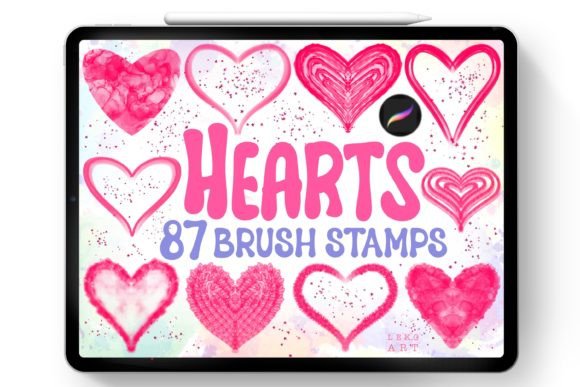
Hearts.brushset. This is the actual data file that Procreate reads to generate the brushes. - 87 Unique Designs: The set includes a diverse variety of heart styles. From solid silhouettes to outlined sketches, glittery textures, and hand-drawn doodles, the variety ensures that you will find the perfect style for any project.
This curated selection eliminates the need to hunt for individual assets across multiple websites. Having them all in one organized set allows for a more cohesive artistic process.
Step-by-Step Installation Guide
For beginners, installing custom brushes can sometimes feel intimidating. However, Procreate has streamlined this process to be incredibly user-friendly. Follow these steps to get your Hearts Brush Stamps Procreate up and running:
Step 1: Download and Locate the File
After purchasing or downloading the resource, locate the ZIP file in your iPad’s "Files" app. It is usually found in the "Downloads" folder unless you specified a different location.
Step 2: Open the File
Tap on the ZIP file. On modern versions of iPadOS, the system may automatically unzip it. If not, tap it once to extract the contents. You should now see the Hearts.brushset file.
Step 3: Import into Procreate
Tap on the Hearts.brushset file. Your iPad should recognize the file type and ask which app you want to use to open it. Select Procreate. Alternatively, you can share the file directly to Procreate from the Files app menu.
Step 4: Verify Installation
Open the Procreate app. Tap on the brush icon to open the Brush Library. Scroll down to the bottom of the list. You should see a new folder labeled "Hearts" or similar. Tap on it, and you will see all 87 brush stamps ready to use.
Note: If the file does not open automatically, you can also import it manually by opening Procreate, tapping the plus sign (+) in the top right corner of the Brush Library, and selecting "Import."
Practical Tips for Using Heart Stamps
Now that the brushes are installed, how do you use them effectively? Here are some practical tips to enhance your creativity:
- Adjust Size and Opacity: Don’t be afraid to experiment. Use two fingers to pinch and zoom to change the brush size. Lowering the opacity can create subtle, dreamy backgrounds, while full opacity makes bold statements.
- Layering: Use multiple layers. Place a layer of large, faint hearts in the background and a layer of small, sharp hearts in the foreground to create depth.
- Color Variation: These stamps take on the currently selected color. Try using a gradient map or clipping mask to change the colors of the hearts after you have stamped them, allowing for non-destructive editing.
- Combination: Mix different heart styles from the set. Combine a sketched heart with a solid one to add visual interest and texture to your composition.
Staying Updated with New Designs
The digital art world is constantly changing, with new trends and tools emerging regularly. To ensure you stay ahead of the curve and continue to expand your creative arsenal, it is beneficial to follow the creator. By subscribing to the designer, you will not miss new designs, updates, or complementary brush sets that may be released in the future.
Subscribing also often provides access to tutorials, community challenges, and exclusive discounts. It transforms a one-time purchase into an ongoing educational resource, helping you grow as an artist over time.
Conclusion
The Hearts Brush Stamps Procreate set is more than just a collection of shapes; it is a tool that empowers artists to express emotion and detail with unprecedented ease. By understanding the specific requirements of the Procreate ecosystem and mastering the simple installation process, you can unlock a new level of productivity in your digital art journey. Whether you are designing a Valentine’s card, decorating a digital planner, or creating social media content, these 87 brushes offer the versatility and charm needed to make your work stand out.
Remember, the key to mastering any digital tool is practice. Experiment with the different styles, play with colors, and most importantly, have fun creating. With the right tools in hand, your imagination is the only limit.