Evaluating Graffiti Letter Stamps for Procreate I
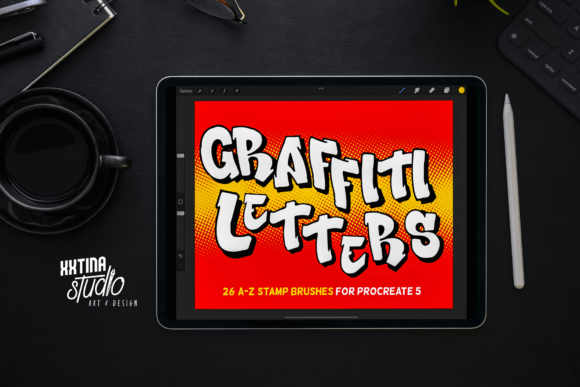
Digital lettering has evolved significantly, moving beyond simple typography tools to encompass complex, hand-drawn aesthetics that mimic traditional media. For artists working within the iPad ecosystem, Graffiti Letter Stamps for Procreate I represents a specialized resource designed to bridge the gap between street art culture and digital illustration. This tool is not merely a font library; it is a curated brush set containing 26 A-Z letter initial stamps, engineered specifically for Procreate 5. Understanding its functionality, limitations, and ideal use cases is essential for determining whether it aligns with your creative workflow.
Understanding the Tool’s Core Functionality
At its foundation, this product provides pre-designed graffiti-style letterforms that users can stamp directly onto their canvas. Unlike standard text tools that rely on vector-based fonts, these stamps are raster-based images integrated into the Procreate brush engine. Each letter from A to Z is oriented to the screen, ensuring that the visual weight and perspective remain consistent regardless of how the device is held or rotated during the drawing process.
A critical technical feature is the inclusion of variable pressure stroke output. While the base shape of the letter is predefined by the stamp, the integration with Apple Pencil pressure sensitivity allows for dynamic adjustments. This means that while the core structure of the bold graffiti letters remains intact, the edges and shadow strokes can respond to the artist’s touch, offering a degree of organic variation that static clip-art lacks. The letters come filled with bold shapes and include shadow strokes, providing immediate depth and dimensionality without requiring manual layering or effect application.
Why Artists Consider This Resource
The primary appeal of Graffiti Letter Stamps for Procreate I lies in efficiency and stylistic consistency. Creating authentic graffiti lettering from scratch requires a deep understanding of form, perspective, and flow. For designers who need to incorporate urban aesthetic elements into broader projects—such as wall mural concepts, cultural event posters, or streetwear graphics—this tool reduces the time investment significantly. Instead of sketching each character individually, artists can place the base forms and then customize them.
Furthermore, the tool serves as an educational aid for those studying lettering structures. By analyzing the pre-built shadows and fills, novice digital artists can observe how light sources and volume are typically rendered in graffiti styles. This makes it useful not just for production, but for learning the underlying principles of three-dimensional letter design.
Benefits and Practical Advantages
- Rapid Prototyping: For concept artists working on murals or large-scale installations, quickly visualizing different name layouts or tag combinations is crucial. These stamps allow for rapid iteration without the fatigue of repetitive drawing.
- Consistent Aesthetic: Maintaining a uniform style across all 26 letters can be challenging when drawing freehand. This set ensures that every character shares the same line weight, shadow angle, and fill density, resulting in a cohesive look.
- Layer Flexibility: Since the stamps function within Procreate, each letter exists on its own layer or can be merged as needed. This allows for non-destructive editing, where colors, textures, and additional effects can be applied independently to each character.
Tradeoffs and Limitations
While efficient, relying on stamp-based lettering involves specific tradeoffs. The most significant limitation is the lack of true typographic flexibility. Because these are image-based stamps rather than editable text layers, you cannot simply type a word and change the font size or spacing algorithmically. Each letter must be placed and positioned manually, which can be time-consuming for longer phrases or paragraphs.
Additionally, the compatibility constraint is strict. The product is compatible only with Procreate 5. Users with older versions of the app or those working in alternative software such as Adobe Fresco, Clip Studio Paint, or Photoshop will find this tool unusable. This locks the user into a specific ecosystem and version history, which may be a concern for professionals who require cross-platform workflows.
Another consideration is the potential for visual repetition. If multiple artists use the same stamp set without significant customization, the resulting artwork may lack uniqueness. The "bold graffiti" style is distinct, but it is also a specific interpretation of street art. Projects requiring subtle, thin-line calligraphy or highly experimental, abstract letterforms may find the predefined shapes too rigid or heavy.
Ideal Use Cases
This tool is a strong fit for specific scenarios where speed and impact are prioritized over granular typographic control. It excels in:
- Mural Planning: Artists can draft full-scale wall designs digitally before committing to paint, allowing clients to visualize the final outcome with accurate proportions and shadows.
- Social Media Graphics: Content creators needing eye-catching headers or initials for posts can generate professional-looking graffiti text quickly.
- Cultural and Event Branding: For hip-hop events, skate competitions, or urban festivals, the authentic street art vibe provides immediate contextual relevance.
When to Consider Alternatives
If your project requires extensive body text, high legibility at small sizes, or precise kerning control, traditional font libraries or vector-based illustration tools may be more appropriate. Similarly, if you aim to develop a unique, signature handwriting style, relying on pre-made stamps might hinder your artistic growth. In such cases, investing time in custom brush creation or freehand lettering practice would yield more personalized results.
Moreover, if you work across multiple devices or software platforms, the Procreate-exclusive nature of this tool is a significant barrier. Cross-platform font files or universal brush sets compatible with multiple applications would offer greater long-term versatility.
Making the Decision
Choosing whether to integrate Graffiti Letter Stamps for Procreate I into your toolkit depends on your specific workflow needs. If you are a Procreate user focused on visual impact, urban aesthetics, and rapid concept development, this set offers a practical solution. It removes the technical barrier of constructing complex 3D letterforms from scratch, allowing you to focus on composition, color theory, and texture.
However, if your work demands high levels of typographic precision, cross-software compatibility, or completely original letterform design, this tool may serve only as a temporary placeholder rather than a final solution. Evaluate your current project requirements against these constraints. For many digital artists, the value lies not in replacing hand-drawn skills, but in augmenting them with efficient, high-quality building blocks that accelerate the creative process.