Streamline Your Digital Planning with Procreate Calendar Stamps
Digital planning has revolutionized the way creatives, students, and professionals organize their lives. However, one of the most tedious aspects of creating a custom digital planner or journal is manually drawing the calendar grids. Aligning dates, ensuring consistent spacing, and correcting mistakes can turn a creative session into a frustrating chore. This is where Procreate Calendar Stamps become an indispensable tool for anyone using the Procreate app on iPad. By integrating specialized brush stamps into your workflow, you can transform hours of repetitive work into a matter of seconds, allowing you to focus on design aesthetics and personalization rather than structural mechanics.
The Challenge of Manual Calendar Creation
For many digital artists, the desire to create a bespoke planner stems from the need for a system that fits their unique lifestyle. Pre-made templates often lack the flexibility required for specific project tracking, habit monitoring, or artistic layouts. When attempting to build these layouts from scratch, users frequently encounter several common hurdles. First, achieving pixel-perfect alignment for days of the week and date numbers is difficult without advanced vector tools, which are not native to the raster-based environment of Procreate. Second, consistency across twelve months is hard to maintain; slight variations in grid size or font placement can make a planner look unprofessional and disjointed.
Furthermore, the time investment required to draw thirty-one individual boxes, label them correctly, and adjust for varying month lengths is significant. This barrier often discourages users from updating their planners regularly or leads to burnout before the planner is even finished. The goal is not just to have a calendar, but to have a functional, beautiful organizational tool that enhances productivity rather than hindering it through cumbersome creation processes.
How Procreate Calendar Brush Stamps Offer a Solution
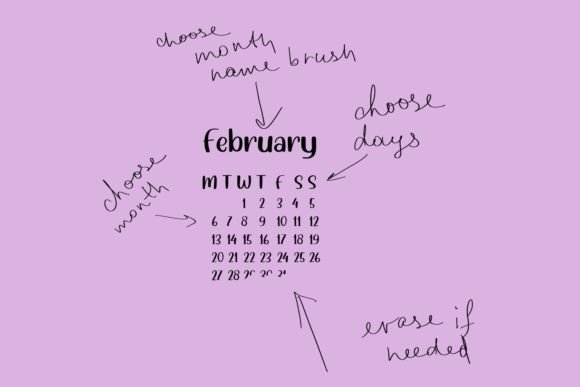
Procreate calendar brush stamps address these pain points by providing pre-designed, high-quality elements that can be stamped onto your canvas instantly. Unlike standard brushes that paint continuous lines, stamp brushes place a complete image or shape with a single tap. In the context of calendar creation, this means you can insert fully formatted month headers, grid structures, and date placeholders with precision and ease.
Using these stamps eliminates the guesswork involved in layout design. Each stamp is crafted to ensure uniformity, meaning your January page will have the exact same structural integrity as your December page. This consistency is crucial for maintaining a cohesive look throughout your digital journal. Moreover, because these are digital assets, they are fully editable. You can resize, recolor, and reposition each element to match your specific theme, whether it is minimalist, floral, corporate, or whimsical. The flexibility of the Procreate environment allows you to blend these structured elements with freehand illustrations, stickers, and handwritten notes seamlessly.
Technical Specifications and Quality Assurance
When selecting digital assets for professional or personal use, quality is paramount. The Procreate Calendar Stamps discussed here are designed with high-resolution output in mind. Delivered at a resolution of 4800 x 3200 pixels, these stamps ensure crisp edges and clear text, even when zoomed in closely on high-density iPad screens. The color mode is set to RGB, which is optimal for digital displays, ensuring that colors appear vibrant and true to life on your device.
Additionally, the files are prepared at 300 DPI (dots per inch). While DPI is traditionally associated with print, having a high-DPI source file provides greater flexibility. It ensures that if you decide to export your planner pages for printing later, the quality remains sharp and professional. It is important to note that this is a digital product only. You will not receive any physical item in the mail. Instead, you will receive a download link containing the brush set and, as a bonus, a completed calendar for 2023 made using these very stamps. This example file serves as both a practical tool for immediate use and a reference guide for how to layer and arrange the elements effectively.
Practical Applications for Different Users
The versatility of Procreate Calendar Stamps means they can be adapted to various user needs. Here is how different groups can leverage this tool:
- Digital Planners and Journalers: For those who maintain daily logs, these stamps allow for rapid setup of weekly and monthly spreads. You can quickly generate a new month’s layout, leaving more time for decorative elements like washi tape designs, mood trackers, and gratitude logs.
- Small Business Owners and Freelancers: Content creators and consultants often need to present social media calendars or project timelines to clients. Using these stamps, you can create visually appealing, branded calendar graphics directly in Procreate without needing to switch to complex desktop software like Adobe InDesign.
- Educators and Students: Teachers can create custom assignment trackers or semester overviews that align with their specific curriculum pacing. Students can use them to build study schedules that are both functional and motivating to look at.
- Artists and Designers: Even if you are not creating a planner, these stamps can be used as compositional elements in digital art pieces, collages, or greeting cards where a date or time motif is relevant.
Implementation Tips for Best Results
To get the most out of your Procreate calendar brush stamps, consider the following best practices. First, always create a new layer for each stamp you place. This non-destructive workflow allows you to move, resize, or delete individual dates or headers without affecting the rest of your design. Second, utilize the "Alpha Lock" feature on your layers if you wish to change the color of the stamp elements directly. This keeps your edits contained within the shape of the stamp.
Since the set includes a 2023 calendar made with these stamps, use it as a template. Open the file, analyze the layer structure, and see how the creator combined different stamps to form a complete page. This reverse-engineering approach is one of the fastest ways to learn new techniques in Procreate. Remember, while the stamps provide the structure, your personal touch comes from the colors, fonts, and additional artwork you add around them.
Why This Tool Is Essential for Modern Digital Creativity
In an era where efficiency and aesthetics are equally valued, tools that bridge the gap between functionality and beauty are rare. Procreate Calendar Stamps do exactly that. They remove the technical barriers to entry for creating complex layouts, making digital planning accessible to beginners while saving time for experts. By automating the repetitive aspects of calendar design, you reclaim creative energy for the parts of planning that truly matter: setting intentions, tracking progress, and expressing creativity.
Whether you are looking to overhaul your current planning system or start a new digital journal from scratch, integrating these brush stamps into your toolkit is a strategic move. They offer a professional finish with minimal effort, ensuring that your digital spaces are as organized and inspiring as your physical ones. With the included 2023 calendar file, you have everything you need to hit the ground running, transforming your iPad into a powerful hub for productivity and artistic expression.