Tape Deck Procreate Color Palette Guide
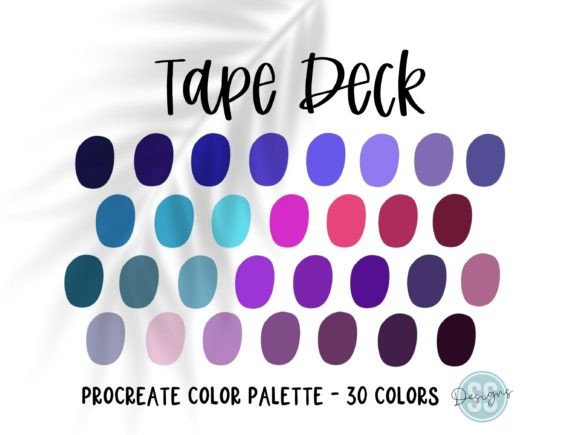
Color selection is often the most paralyzing part of the digital illustration process. Whether you are sketching a quick concept or rendering a final piece for a client, staring at a blank color wheel can drain your creative momentum before you even begin. This is where curated resources become essential tools rather than just shortcuts. The Tape Deck Procreate Color Palette offers a solution to this common bottleneck by providing thirty beautiful, hand-selected colors designed specifically for use within the Procreate ecosystem.
This collection is not merely a random assortment of hues. It is a pre-selected system intended to save you time on your next project and let the colors inspire your creation. By removing the guesswork from color theory, artists can focus entirely on composition, lighting, and storytelling. However, the value of such a tool varies significantly depending on who is holding the stylus. Understanding how different creators interact with these palettes can help you decide if this resource aligns with your current workflow and artistic goals.
Why Pre-Selected Colors Matter in Digital Art
In traditional media, mixing paints requires physical effort and material knowledge. In digital art, the infinite possibility of the RGB spectrum can be equally daunting. A curated palette like Tape Deck acts as a constraint, which paradoxically fosters creativity. When you limit your choices to thirty specific tones, you are forced to explore the relationships between those colors more deeply. You learn how a specific muted teal interacts with a warm ochre, or how a deep violet provides shadow without turning muddy.
For many users, the primary benefit is efficiency. Time spent hunting for the perfect shade is time taken away from actual drawing. By importing a .swatches file that is already balanced for harmony, you ensure that every stroke you make contributes to a cohesive visual language. This consistency is crucial for maintaining a professional look across multiple pieces or within a single complex illustration.
Perspectives from Different Creators
The utility of the Tape Deck Procreate Color Palette shifts depending on your experience level and professional objectives. Here is how various groups might evaluate and utilize this resource.
Beginners and Hobbyists
For those new to Procreate, the interface itself can be overwhelming. Adding complex color theory into the mix often leads to frustration. Beginners frequently struggle with saturation and value, resulting in artwork that feels "off" despite good linework. Using a hand-selected palette removes this variable. It allows new artists to produce visually pleasing results early in their journey, which builds confidence.
Moreover, hobbyists who draw for relaxation rather than profit may not want to spend hours studying color wheels. They want to open the app and start creating immediately. The Tape Deck palette serves as an instant upgrade to their toolkit, making the casual drawing session more rewarding without requiring additional study.
Professional Illustrators and Freelancers
Experienced artists often have their own preferred palettes, but they also face tight deadlines. For freelancers, speed is directly tied to income. A pre-made palette can be a lifesaver when working on rapid-turnaround projects, such as editorial illustrations or social media content. Instead of building a color scheme from scratch, a professional can import Tape Deck, tweak a few values to match a brand’s identity, and begin rendering.
Additionally, professionals value reliability. Knowing that a palette has been tested for harmony means less time correcting color clashes during the revision phase. It acts as a safety net, ensuring that even under pressure, the foundational colors remain solid.
Entrepreneurs and Small Business Owners
If you run a small business that relies on visual content—such as an Etsy shop owner, a blogger, or a marketer—consistency is key to brand recognition. You may not be a trained illustrator, but you need your graphics to look polished. The Tape Deck palette offers a set of aesthetically pleasing colors that can unify your Instagram posts, product mockups, or newsletter headers.
For this audience, the priority is ease of use and presentation. The ability to quickly generate attractive visuals without hiring a designer adds significant value. These thirty colors can become part of your brand’s visual vocabulary, helping you maintain a cohesive look across all customer touchpoints.
Educators and Content Creators
Teachers and tutorial creators often need to demonstrate concepts clearly. Using a distinct, well-balanced palette helps students focus on the technique being taught rather than getting distracted by clashing colors. Educators can use the Tape Deck palette in lesson plans to show how limited color schemes work in practice. It provides a concrete example of how restriction can lead to better design outcomes.
Practical Application and System Requirements
Before purchasing or downloading any digital asset, it is vital to understand the technical requirements. Please note that you must have the Procreate app installed on your iPad to be able to download and use this file. The palette is distributed as a .swatches file, which is the native format for Procreate color libraries. This ensures seamless integration without the need for third-party converters or complex setup procedures.
The package includes one .swatches file containing the thirty hand-selected colors. Once imported, these colors appear in your palette library, ready to be used in any project. The simplicity of the delivery method reflects the product’s philosophy: straightforward, functional, and focused on art-making.
How to Import Palettes into Procreate
If you are unfamiliar with adding external resources to Procreate, the process is intuitive but specific. For more detail about how to import palettes into the Procreate application, please refer to the official Procreate Handbook section on colors and palettes. Generally, the process involves tapping the color circle, selecting the palettes tab, and using the import function to locate your downloaded .swatches file. Once imported, the Tape Deck colors will be available alongside your default libraries.
Evaluating Fit for Your Workflow
Deciding whether to incorporate the Tape Deck Procreate Color Palette into your routine depends on your current needs. Ask yourself the following questions:
- Do I struggle with color harmony? If your artwork often looks disjointed because of conflicting hues, a curated palette can provide immediate improvement.
- Is speed a priority? If you frequently miss deadlines due to indecision, pre-selected colors can streamline your workflow.
- Am I looking for inspiration? Sometimes, seeing a unique combination of tones can spark ideas for characters, environments, or moods you hadn’t considered.
- Do I value long-term usefulness? Unlike trend-based colors, a well-designed palette remains relevant across various styles and projects.
It is important to remember that using a pre-made palette does not limit your creativity. You can still adjust brightness, saturation, and hue within Procreate. The Tape Deck palette serves as a starting point, a foundation upon which you can build. You might use all thirty colors, or you might find that five of them become your new favorites for a specific series of works.
Final Thoughts on Creative Tools
Digital art tools are abundant, but few address the psychological hurdle of starting a piece. The Tape Deck Procreate Color Palette is more than a list of hex codes; it is a catalyst for creation. By offering thirty beautiful, hand-selected colors, it invites you to bypass the initial friction of choice and dive straight into the act of drawing.
Whether you are a student learning the ropes, a professional managing a busy schedule, or a business owner trying to elevate your brand visuals, this resource offers practical value. It respects your time and supports your artistic intent. As you explore these colors, allow them to guide your hand, but do not be afraid to make them your own. The true power of any tool lies not in its features, but in how effectively it helps you express your unique vision.