Unlocking Creativity with the Radiant Orchid Procreate Color Palette
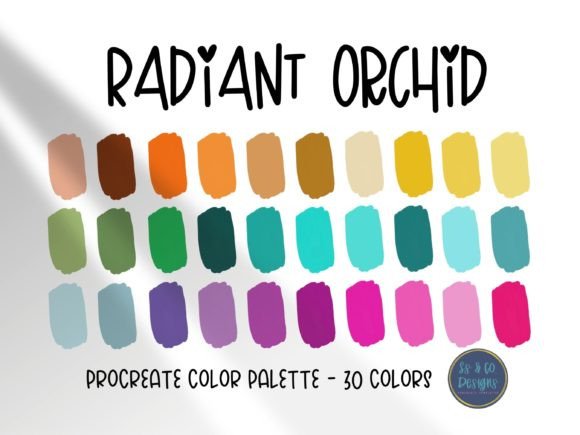
Digital illustration thrives on momentum. When inspiration strikes, the last thing you want is to fumble with color wheels or spend twenty minutes tweaking saturation sliders. This is where a curated collection becomes an essential tool rather than just a luxury. The Radiant Orchid Procreate Color Palette offers a solution to this common creative bottleneck. It provides thirty beautiful, hand-selected colors designed specifically to streamline your workflow and elevate the visual impact of your artwork. However, simply downloading a palette is not enough. To truly benefit from these pre-selected hues, artists must understand how to integrate them effectively into their existing processes.
Understanding the Value of Curated Colors
The Radiant Orchid theme is more than just a trend; it is a complex interplay of purple, pink, and magenta tones that evoke creativity, originality, and enchantment. For digital artists using Procreate, having these shades pre-mixed saves significant time. Instead of guessing which violet complements a specific shade of lavender, you have a reliable set of thirty options ready to go. This efficiency allows you to focus on composition, lighting, and storytelling rather than technical color theory adjustments.
Many beginners mistakenly believe that professional artists create every single hue from scratch for every project. In reality, most professionals rely on trusted palettes that they have refined over years. Using a high-quality, pre-made palette like this one does not diminish your skill; it enhances your speed and consistency. It ensures that your color choices remain harmonious, preventing the muddy or clashing results that often occur when selecting colors in isolation.
Common Mistakes When Using Pre-Selected Palettes
While the Radiant Orchid Procreate Color Palette is designed to help, improper usage can lead to flat or repetitive artwork. One frequent error is relying exclusively on the provided colors without adjusting opacity or blending modes. Digital painting is dynamic. If you use the colors straight from the swatch at full opacity, your piece may lack depth. A better approach is to use these thirty colors as your base anchors. Layer them, reduce their opacity, and blend them with white or black to create tints and shades that expand the palette’s range while maintaining its core identity.
Another misunderstanding involves context. Some users download the file and expect it to work perfectly for every type of illustration, from dark fantasy to bright children’s books. While versatile, this palette leans towards vibrant, energetic tones. Using it for a somber, muted landscape might require significant modification. Before starting a new project, assess whether the mood of the Radiant Orchid spectrum aligns with your narrative. If it does not, consider using only two or three accent colors from the palette against a neutral background, rather than forcing the entire scheme onto an incompatible subject.
Technical Requirements and Installation Errors
A critical, often overlooked detail is the system requirement. You must have the Procreate app installed on an iPad to use this file. It is not compatible with Photoshop, Clip Studio Paint, or desktop-based software. Attempting to open the file on a computer will result in confusion and wasted time. Always verify your device compatibility before purchasing or downloading.
Furthermore, many users struggle with the import process. A common mistake is trying to drag and drop the file incorrectly or looking for it in the wrong folder within the app. To avoid frustration, follow the official guidelines. For detailed instructions on how to import palettes into the Procreate application, please refer to the Procreate Handbook section on colors and color palettes. Understanding the correct import method ensures that your thirty beautiful colors appear exactly where they should, ready for immediate use.
Maximizing Efficiency and Quality
To get the most out of this resource, treat it as a learning tool. Analyze why these specific thirty colors work together. Notice how the lighter lavenders balance the deeper purples. This observation can improve your own color theory skills, allowing you to build better custom palettes in the future. Use the Radiant Orchid Procreate Color Palette to experiment with gradients and shadows. Try creating a monochromatic piece using only variations of these hues. This exercise builds confidence and demonstrates the versatility of a well-curated selection.
For entrepreneurs and marketers, consistency is key. If you are creating brand assets or social media graphics, using a consistent color scheme helps build recognition. This palette can serve as the foundation for a cohesive visual identity. However, ensure that the colors meet accessibility standards if you are designing text-heavy graphics. Bright orchids and pinks can sometimes lack contrast against white backgrounds. Always test your final designs for readability.
What to Check Before You Begin
Before diving into your next project, take a moment to evaluate your needs. Ask yourself if the current project benefits from a vibrant, imaginative color story. If yes, this palette is an excellent choice. Check that your Procreate app is updated to the latest version to ensure smooth compatibility with newer file formats. Also, organize your workspace. Create a dedicated folder for your downloaded palettes so you can easily locate them later. Disorganization leads to repeated downloads and cluttered libraries, which slows down your creative flow.
Remember, the goal is to let the colors inspire your creation, not restrict it. Use the thirty hand-selected shades as a launchpad. Mix them with other elements, adjust their brightness, and make them your own. By avoiding common pitfalls and understanding the technical requirements, you transform a simple download into a powerful asset for your artistic toolkit. Whether you are a hobbyist exploring digital art for the first time or a seasoned freelancer looking to speed up your workflow, the right tools make all the difference. Embrace the convenience, respect the technical constraints, and let your creativity flourish with confidence.